Artisan implements versions 5.0, 3.1.1, and 3.1 of the MQTT protocol over TCP or WebSockets with optional Transport Layer Security (TLS) and broker authentication. Credentials are stored in the operating system’s keychain system. Connect timeout and keepalive periods can be configured.
Input Channels
Artisan supports 12 MQTT input data channels assigned to the corresponding device types (MQTT, MQTT 34, MQTT 56, …) each delivering data for two channels. A connection with the broker is established on pressing the ON button, which subscribes to the specified topics. Each input extracts its data from the payloads received for the main topic or, if provided, the input-specific topics.
Nodes
For each input, a JMESPath node expression is used to extract the reading from the received payload. The JMESPath query language provides basic expressions, slicing, projections, pipe expressions, multi-selects, and functions on JSON data.
For example, for the payload
{"foo": {"bar": [1, 2]}}
the JMESPath expression
foo.bar[0]
extracts the value 1.
Modes
If mode for a channel is set to C or F, extracted readings are automatically converted to Artisans temperature unit.
Publish
Artisan provides the IO Command
publish(<topic>, <value>)
to publish the value <value> to the topic <topic> on the connected MQTT broker. This command can be used in alarm, button or slider actions.
For example, in the example below, the first button with the IO Command action
publish(/my/topic,value)
sends the fixed JSON message
{"value":10}
to the topic /my/topic. Note that the curled brackets need to be quoted by duplication.
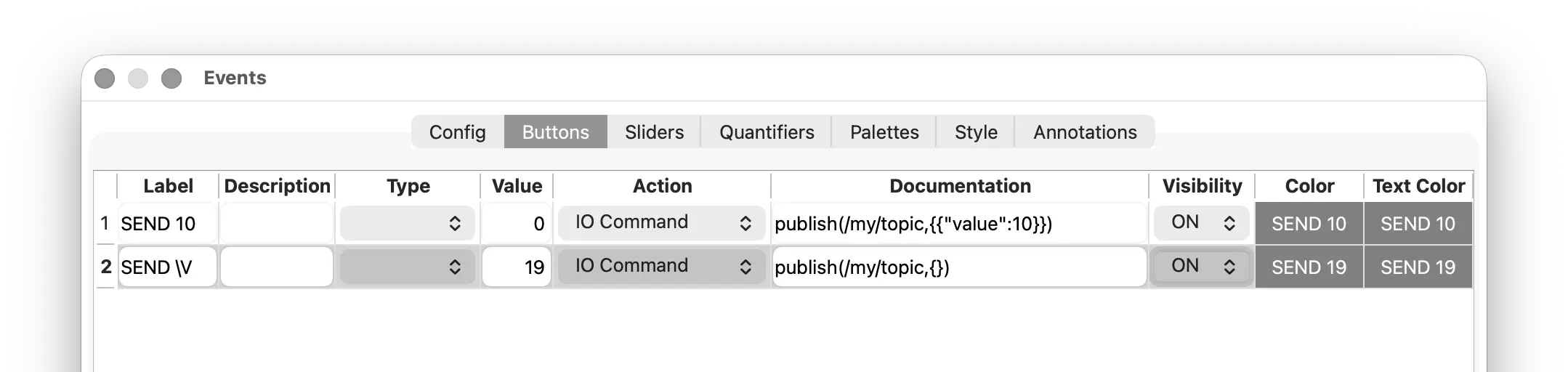
The second button with the IO Command action
publish(/my/topic,{})
sends the button’s value (here 19) to the same topic /my/topic. Note that the placeholder symbol {} (no quoting here!) gets substituted by the button value in button actions.